Cyber Security Tips for Small Business: Protecting Data On and Off the Screen

A login screen interface on a laptop, demonstrating the importance of cyber security for business assets.

Quick Summary

  • Drop-off is cheapest: You bring documents to a facility and pay by the pound or by the box.
  • Mobile costs more: A truck comes to you and shreds on site, priced per visit or per bin.
  • Weight vs. volume: Retail stores charge by the pound. Records companies usually charge by the box.
  • Certification matters: A NAID AAA provider gives you a Certificate of Destruction. Cheaper options often don’t.

Your business holds the same categories of sensitive data a large corporation does. Customer payment details, employee tax forms, signed client contracts, vendor banking information, and retired laptops are all sitting somewhere in your office right now. What you probably don’t have is a full-time security team keeping watch over any of it.

Most security advice for smaller companies stops at passwords and software updates. Those habits matter, but they only cover data that lives on a screen, not the payroll reports in an unlocked cabinet or the old workstation left beside the dumpster. The cyber security tips for small business owners here cover both. 

Why Small Businesses Get Targeted

A common assumption among owners is that their company is too small to be worth an attacker’s attention. The truth is that automated tools scan for exposed accounts, unpatched software, and reused passwords across thousands of domains at a time.

Smaller companies also tend to hold data worth stealing while carrying fewer controls around it. Payroll files, customer payment records, tax documents, and health information all sit in offices with no dedicated IT staff, no formal retention schedule, and no documented process for what happens to a hard drive when it retires. If your company supplies or subcontracts for a larger organization, your access can also become the path into theirs.

For a broader look at where the threat landscape is heading, our overview of the top information security risks in 2026 covers the trends worth watching this year.

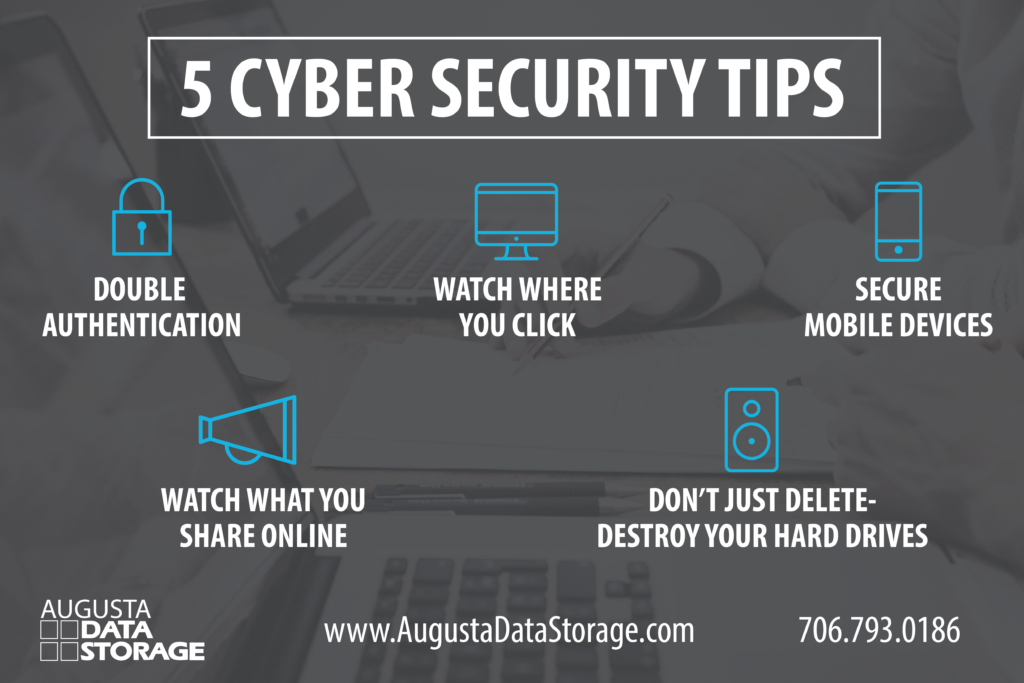
Five cyber security tips every small business should put in place, covering both digital accounts and physical hardware.

5 Cyber Security Tips for Small Business

These five habits stop the most common intrusions, and none of them require a security budget or an outside consultant. 

1. Turn On Double Authentication

Passwords get reused, guessed, and leaked in breaches at other companies. Double authentication, also called multi-factor authentication, means a stolen password on its own isn’t enough to get in. Enable it on email first, since an email account is the recovery point for nearly everything else, then work through banking, payroll, accounting software, and any system holding customer records.

2. Watch Where You Click

Business email compromise is the most financially damaging attack type aimed at businesses, driving more than $3 billion in reported losses in 2025 according to the FBI. Some versions require no intrusion at all, just an email that looks close enough to a vendor you already pay. An attacker who has been reading a compromised inbox learns how your team talks about invoices. 

  • Verify any change to payment details by phone, using a number you already have on file rather than one in the email.
  • Treat urgency as a warning sign, particularly when a request discourages the sender from being contacted directly.
  • Give employees a way to report a suspicious message that doesn’t involve admitting they clicked something.
  • Refresh the training on a schedule instead of once at onboarding.

Our guide to employee education on information security walks through building a program your staff will remember.

3. Secure Mobile Devices

Phones and tablets hold company email, saved passwords, and client contact information, and they leave the building every day. Require a passcode or biometric lock on any device that reaches company email, and turn on remote wipe so a lost phone can be cleared before somebody starts reading it. Keep company data out of personal cloud backups you have no visibility into. Public Wi-Fi deserves the same caution, so use a VPN when an employee has no alternative.

4. Watch What You Share Online

Attackers often research before they send. A staff page listing every name and title tells them who handles money. A post announcing your new office manager tells them who is too new to question an unusual request. An out-of-office reply naming a backup approver tells them exactly when to send one.

Review what your website and social accounts reveal about your finance staff and your vendor relationships. Ask employees to think twice before posting about projects, suppliers, or travel schedules, since each detail makes a fraudulent request easier to write convincingly.

5. Don’t Just Delete, Destroy Your Hard Drives

Deleting a file doesn’t remove it, and reformatting a drive doesn’t either. Recovery software pulls readable data off drives that were wiped, sold, donated, or recycled through a general e-waste bin. Copiers and multifunction printers store scanned images on internal drives as well, which surprises most owners when a leased machine goes back to the vendor.

Physical hard drive destruction is the only method that removes the possibility of recovery, and it comes with the same certificate paper shredding does.

More Digital Protections Worth Putting in Place

Once the five habits above are in place, these four close the gaps attackers look for next.

Keep Software and Devices Updated

The gap between a patch being released and a patch being installed is the window attackers work in, and the vulnerability is public information the moment the update ships. Turn on automatic updates where you can. Where you can’t, put a recurring reminder on someone’s calendar and make it their named responsibility. Include the equipment people forget, like routers, network printers that store scan history, point-of-sale terminals, and any device an employee uses from home.

Back Up Your Data and Keep One Copy Offline

Ransomware encrypts whatever it can reach, and a backup that stays permanently connected to your network can be reached. An offline copy is the version that survives, which is why the physical air gap has quietly become one of the stronger defenses available to a small company.

Our breakdown of the air-gapped advantage explains how offline media rotation works and why the 3-2-1-1 rule has replaced the older standard.

Limit Access by Role

Not everyone needs everything. A part-time bookkeeper doesn’t need the customer database, and a summer intern doesn’t need the payroll folder. Grant access by what a job requires, review it when someone changes roles, and remove it the day someone leaves. Shared logins make all of this impossible to track, so give every person their own credentials.

Lock Down Your Wi-Fi Network

Router credentials shipped from the factory are published online, so change the administrator password and the default network name. Put guests and customers on a separate network that has no path to the systems your staff uses. Check that the network runs current encryption rather than a standard nobody has updated since the router was installed.

Physical Security Tips Most Small Businesses Overlook

Every digital protection above assumes the data is on a screen, but plenty of it isn’t. Client files, HR paperwork, tax records, and retired equipment hold the same information a hacker would go after, and they sit in rooms most employees can walk into.

1. Lock Up Active Files and Control the Keys

Filing cabinets holding personal information should lock, and the keys should belong to named people rather than living in a shared drawer. Apply the same thinking to the file room itself. If cleaning crews, delivery drivers, or contractors move through your office unaccompanied after hours, they shouldn’t be passing open cabinets of employee records on the way.

2. Put a Clean Desk Policy in Writing

Paperwork left out overnight is the most common physical exposure in an office, and it’s the easiest to fix. A clean desk policy sets the expectation that sensitive documents go into locked storage at the end of the day rather than staying in a stack beside a monitor. Writing it down turns a preference into a standard people can be held to.

We put together seven tips for maintaining a clean desk policy, including a template you can adapt for your own office.

3. Move Archived Records Into a Secure Facility

Older records are usually the least protected, because nobody thinks about them. Boxes migrate to a back room, a garage, or a rented self-storage unit that has no climate control, no surveillance, and no record of who opened the door. Those files still carry legal obligations, and a flood or a break-in is still your liability.

A NARA compliant records storage facility handles archived files with monitored access, fire suppression, climate control, and a documented chain of custody for every box.

4. Shred Documents Instead of Discarding Them

A document in your dumpster is legally abandoned, and dumpster diving remains a working method for identity thieves because it keeps paying off. Office shredders make people feel covered while producing strips a patient person can reassemble, and they jam long before a purge is finished.

Professional mobile shredding destroys documents beyond reconstruction and produces a Certificate of Destruction.

5. Destroy Old Hard Drives and Devices

Deleting a file doesn’t remove it, and reformatting a drive doesn’t either. Recovery software pulls readable data off drives that were wiped, sold, donated, or recycled through a general e-waste bin. Copiers and multifunction printers store scanned images on internal drives as well, which surprises most owners when a leased machine goes back to the vendor.

Physical hard drive destruction is the only method that removes the possibility of recovery, and it comes with the same certificate paper shredding does.

Your Small Business Cybersecurity Checklist

Quick Checklist: Digital and Physical Protection

  • Multi-factor authentication is turned on for email, banking, payroll, and any system with customer data.
  • Every employee has individual login credentials, and departing employees lose access the same day.
  • Software updates install automatically, or a named person checks them on a set schedule.
  • Backups run regularly, and at least one copy is stored offline.
  • Staff receive phishing and payment fraud training more than once, and know how to report a suspicious message.
  • Cabinets and rooms holding personal information lock, and key holders are documented.
  • A written clean desk policy is in place and enforced.
  • Archived records are stored in a secure, monitored facility rather than a back room or self-storage unit.
  • Documents past their retention period are shredded by a certified provider, with certificates kept on file.
  • Retired drives, laptops, and copiers are physically destroyed rather than resold or recycled.

What to Do If You Suspect a Breach

Speed matters more than certainty in the first hours. Disconnect the affected device from the network without powering it down, since shutting it off can destroy evidence investigators need. Change credentials from a device you know is clean. Write down what happened and when, because Georgia notification requirements run on deadlines you’ll need to prove you met.

Our data breach response checklist covers the first 24 hours step by step, including who to notify and in what order.

Protect the Half of Your Data That Never Touches a Screen

Most small businesses put their security effort into the network and leave the file room alone. You protect the network and train your staff, then walk past an unlocked cabinet of employee records on the way out. An attacker would take that cabinet over your firewall any day.

Augusta Data Storage has spent more than 25 years protecting physical records for businesses across the CSRA. We offer secure records storage in a NARA compliant facility, climate-controlled media vaults, NAID AAA certified shredding for documents past their retention date, and hard drive destruction for equipment you’re retiring, all with the documentation you need if anyone asks how your data was handled.

Contact Augusta Data Storage today to talk through a security plan for the records your network can’t protect.

Frequently Asked Questions

What are the most important cyber security tips for a small business?

Start with multi-factor authentication on email and financial accounts, individual logins for every employee, automatic software updates, and a backup with one copy kept offline. Those four steps block the majority of automated attacks. Once they are in place, turn to the physical side by locking file storage and setting up secure destruction for records you no longer need.

Does cyber security include protecting physical documents, or only digital data?

Information security covers both, though most guidance only addresses the digital half. A stolen paper file exposes the same customer or employee data a hacked database does, and it carries the same notification obligations under Georgia law. Regulations like HIPAA and FACTA apply to paper records explicitly, which is why secure storage and certified destruction belong in any security program.

What should a business do if it suspects an email account has been hacked?

Change the password immediately from a different device, turn on multi-factor authentication if it wasn’t already active, and check the account for forwarding rules an attacker may have added to keep reading mail after being locked out. Notify anyone who may have received messages from the account, especially if payment instructions were discussed. Contact your bank right away if any transfer was requested or sent.

How often should a small business review its security practices?

A quarterly review is enough for most small companies, with an additional check any time someone joins or leaves, a vendor changes, or new software gets added. Retention schedules and destruction dates are worth reviewing annually so records don’t sit past their required lifespan.

What is the difference between a data breach and a cyber attack?

A cyber attack is the attempt, and a breach is what happens when the attempt succeeds and protected information gets exposed or taken. Not every attack becomes a breach. A breach can also happen without any attack at all, through a lost laptop, a misdirected email, or a box of files left where the wrong person found it.